
Setting up a spam filter correctly? Here’s how

What does your mailbox look like in the morning when you start work? Chances are you first have to wade through a whole pile of spam. Long live onlinespamfilter.nl! Still, that is no guarantee that you will never get a spam email again. Fortunately, there is plenty you can do yourself to improve the performance of your spam filter. In this blog we tell you how.
Unwanted messages
We wrote it before: there is no spam filter in the world that never makes mistakes. Let’s first look at what spam actually is. According to Rijksoverheid (the Dutch government), spam is ‘a message you receive unsolicited by email, mobile phone or landline’. For one person an email from football club Feyenoord is spam; another – yes, I can hardly believe it either – sees an email from NAC Breda as spam. Someone who is a committed BMW driver is not waiting for an email from Mercedes, and vice versa.
Self-learning system
So how do you set up your spam filter so that its performance improves? A piece of cake for us, but around us we still often hear questions about how to set up your spam filter properly and optimise it as you go. Let’s start by saying that Onlinespamfilter is guaranteed to filter out 99.9 percent of all spam messages already. And just as a person is never too old to learn, neither is our spam filter. The beauty of it is that it is a self-learning system, built from components that keep an eye on each other. If one of them deviates, the system corrects itself. We don’t have to do anything for that; the smart algorithm takes care of it, in real time. It looks at suspicious word combinations, the structure of an email and it analyses data, whole mountains of data.
Adjusting parameters – individually or for the whole organisation
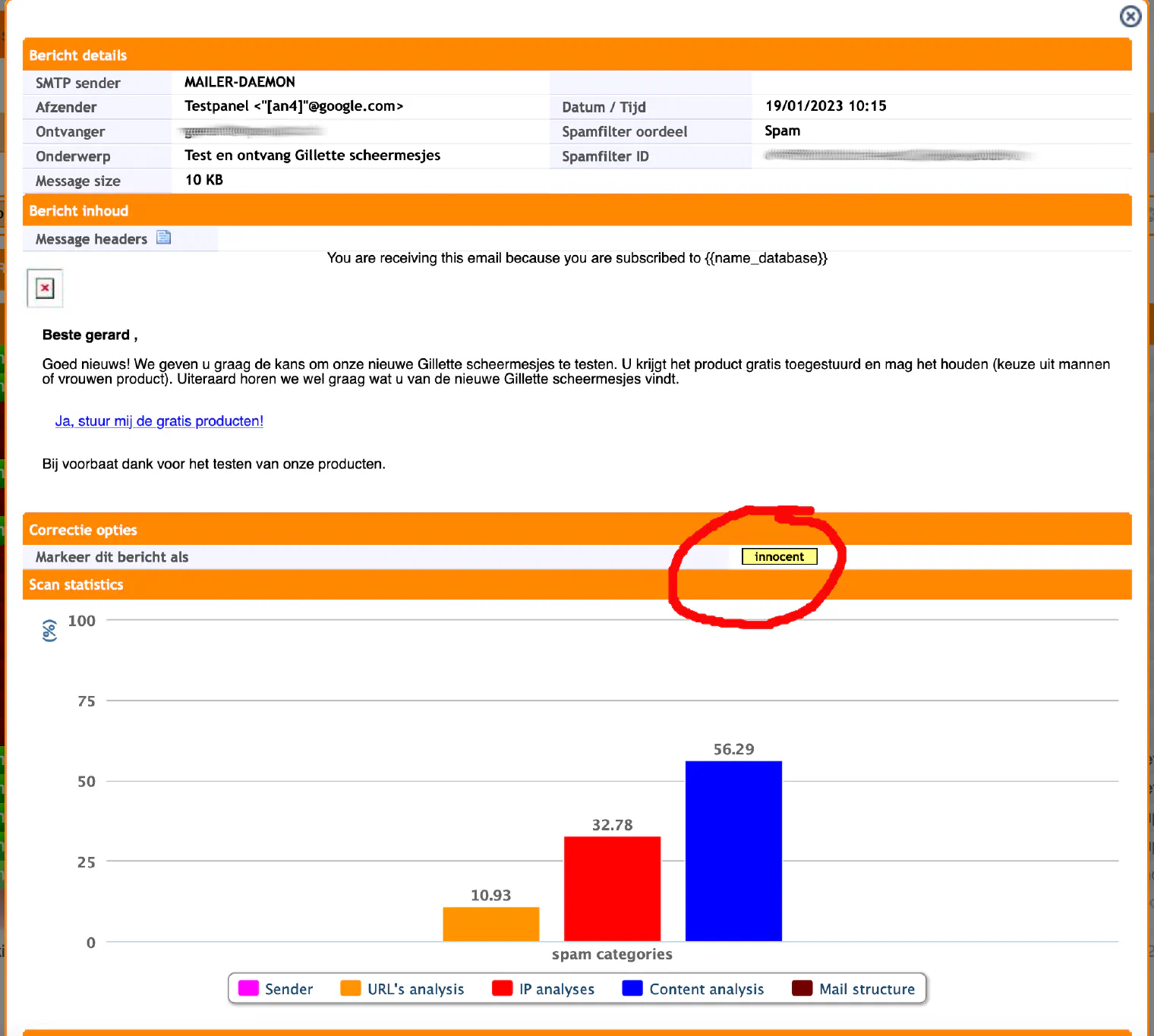
But no system is watertight; a spam email can still slip through. And yes: this is where people come in. Fortunately. If you get an email that you consider spam – that email from Feyenoord, to name just one – you can tell the system by pressing the ‘Spam’ button in the correction options. The system will then automatically adjust the parameters for you. If several employees do this, the system adjusts the parameters for the whole organisation. If you don’t receive a certain email and discover it was wrongly marked as spam, you can indicate that too, by pressing the ‘Innocent’ button in the correction options. From then on, emails from that sender will no longer be stopped.
A child could do the washing, but you still have to do it
If you have to jump through all sorts of hoops to filter your incoming email, we haven’t done our job properly. It should be simple and clear, and it is. At least, that’s what our customers tell us. A few clicks and your spam filter works even better than it already did. But people do have to actually do it, of course. It’s just like the washing. If you leave the laundry basket next to the washing machine, that washing will never, ever get clean. Guaranteed.
Try it for free?
We can tell you all sorts of things, of course, but we can imagine you would like to see that spam filter in action. Try it for free.
Want our newsletter?
Would you like to stay up to date with the latest news and the most recent developments? Then follow our LinkedIn page.